Matrices
Matrices in AUXLAB follow the same general style as vectors, with row-wise storage and matrix-aware indexing rules.
Arithmetic With Scalars And Matrices
A scalar can be added to every element of a matrix.
AUX> [3 4; 4 1] + 10
ans =
13 14
14 11
- To add one matrix to another, both must have the same row count. The operation then becomes a vector operation for each row.

AUX> [1 2; 3 4]+[.1 .2; .3 .4]
ans =
1.1 2.2
3.3 4.4
- Two operands may have different column counts, in which case the operation follows the vector rules row by row.

AUX> (1:6).matrix(2)+[1 6; 10 10]
ans =
2 8 3
14 15 6
- If one operand is a column vector, it is applied row-wise.

AUX> (1:12).matrix(3)+[10 -6 0]'
ans =
11 12 13 14
-1 0 1 2
9 10 11 12
Matrix Indexing
- Indexing a matrix takes two values, row and column indices, separated by a comma.
- The colon operator can represent consecutive numbers, and a vector can also be used as an index.
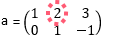
AUX> a(1,2) = 8;
AUX> a
a = 1 8 3
0 1 -1
- If a matrix is indexed with only one value, it uses serialized indexing.
- AUXLAB stores matrix data row-wise.
- In the older help example, the serialized order is shown below.
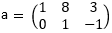
- The indexing keyword
endrefers to row count, column count, or total element count depending on where it appears.
a(end,1) // end means 2
a(1,end) // end means 3
a(end)   // end means 6
Replacement Rules
- Replacement of matrix elements follows the same general principles as vector indexing.
- If the right-hand side is a scalar, that scalar can be applied over the targeted matrix region.
- If the right-hand side is a column vector, its values can be applied row by row.
AUX> a(1,end) = [7 6]   // Invalid! LHS is 2x1, RHS is 1x2
AUX> a(1,end) = [7 6]'  // There you go!
- If the target elements are not described by simple row/column indexing, serialized indexing can be used.
AUX> a([2 4]) = rand(2) // rand(2) generates a 2-element vector of random numbers
AUX> a
a =
1 0.2736 3
0.8461 1 -1
Compound Assignment And Conditional Indexing
Compound operators and conditional indexing can be combined for concise matrix manipulations.
AUX> x=rand(100).matrix(10);
AUX> x((1:end)%2==0,:) *= 10;
AUX> x(:,[2 5 7]) *= -1;
AUX> x*=100; x=x.round; x/=100 // to round up to third decimal place
Current source basis:
matrices.html